
While writing Framer code overrides, I got sidetracked after misunderstanding the logic for accessing and modifying components' variables.
Where to apply the code override from
Let's say I have a component that has two variables :
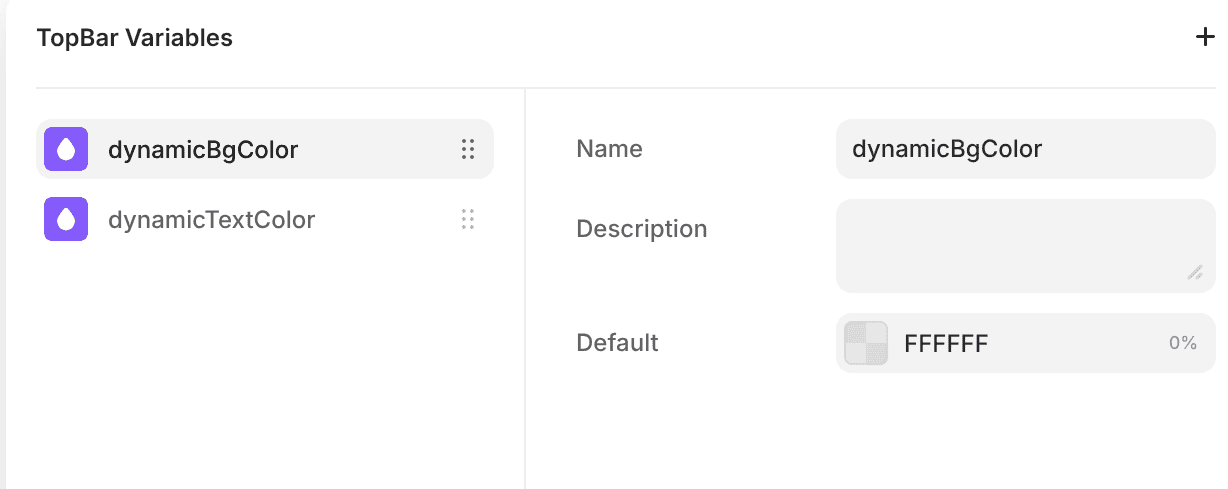
I added a code override to the component, and tried to see if I could read the variables from the component's props:
import { forwardRef, type ComponentType } from "react"


export function withTransition(Component): ComponentType {

	return forwardRef((props, ref) => {
		console.log(props)
		return (
			<Component
				{...props}
			/>

		)

	})

}
That did not seem to work, the logged object never contained the variables. I figured it out after a bit of tinkering and hair-pulling :
- You need to apply the override from the parent that instantiates the component to be allowed to play with the component's variables
So I removed the code-override in the component definition, and added it on the component, from the page that uses it.
Modifying color variables
I did not get it right on the second try either. Here's what I tried to do :
import { forwardRef, type ComponentType } from "react"


export function withTransition(Component): ComponentType {
    return forwardRef((props, ref) => {

        return (
            <Component
                {...props}
                dynamicBgColor="#ff0000ff"
                dynamicTextColor="#00ff00ff"
            />
        )
    })
}
No reason why this shouldn't work, right ? Well it seems like color variables must be defined in rgba(r,g,b,a) format to work properly in Framer !
So after a small tweak, I was able to control the variable value from the code override :
import { forwardRef, type ComponentType } from "react"


export function withTransition(Component): ComponentType {
    return forwardRef((props, ref) => {

        return (
            <Component
                {...props}
                dynamicBgColor="rgba(255,0,0,1)"
                dynamicTextColor="rgba(0,255,0,1)"
            />
        )
    })
}
Here's the component I was actually building by the way, it's applied to the navbar so that it switches to white background, black text color when the scroll position reaches 150 (px, em, centimeters? no idea)
import { forwardRef, useEffect, type ComponentType } from "react"
import { useScroll, useMotionValue, animate } from "framer-motion"

export function withTransition(Component): ComponentType {
    return forwardRef((props, ref) => {
        const { dynamicBgColor, dynamicTextColor } = props
        const { scrollY } = useScroll()
        const textColor = useMotionValue(dynamicTextColor)
        const backgroundColor = useMotionValue(dynamicBgColor)

        const transition = {
            ease: "easeInOut",
        }

        const onScrollChange = () => {
            if (scrollY.get() > 150) {
                animate(textColor, "rgba(0, 0, 0, 1)", transition)
                animate(backgroundColor, "rgba(255,255,255, 1)", transition)
            } else {
                animate(textColor, dynamicTextColor, transition)
                animate(backgroundColor, dynamicBgColor, transition)
            }
        }

        useEffect(() => {
            onScrollChange()
            return scrollY.onChange(onScrollChange)
        }, [])

        return (
            <Component
                {...props}
                ref={ref}
                dynamicBgColor={backgroundColor}
                dynamicTextColor={textColor}
            />
        )
    })
}